
|
|
Now that your race is set, you need
to determine what skills and attributes your character will have.
This should be based on the character's background and desired
occupation. 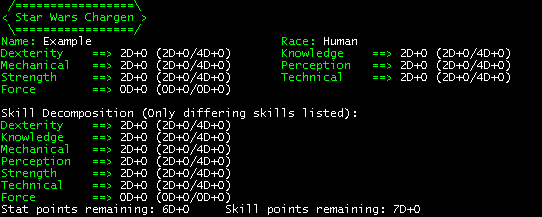 Next to each current value will be two sets of values seperated by a slash. The first is the minimum value, the second is the maximum value. Notice that all of your stats are currently set at their minimum values. It is important to understand how these values work. The value of each attribute is denoted by #d#, such as 2d1. This means that for t hat attribute, the character has a proficiency of 2 dice and 1 pip. So, if that attribute were checked, the MUSH would simulate rolling 2 die, add the values together, and add 1 to the total. At the bottom of the @chargen/display grid, your unassigned attribute points are displayed. These are what you use to increase your character's attributes. Points can be used to add dice and pips. The easiest way to do this is to use the commands:
which adds 2 die to the current value, or which sets the value at 4d0. Bear in mind that stats can never be higher than the stat's maximum value. To check your progress, you can always type @chargen/display for an updated grid. |


|